

· 9 min read
AI-Powered Cost Analysis and Anomaly Detection on AWS
How does AI revolutionize FinOps? Discover autonomous cost optimization through the OpenOps platform with practical examples!
Introduction
FinOps (Financial Operations) is an operational framework and organizational culture that maximizes the business value of technology investments, enables timely, data-driven decision-making, and creates financial accountability through collaboration among engineering, finance, and business teams. It is not simply about cutting costs or holding developers accountable, but rather a cultural shift that brings analytical financial practices into the cloud computing world as a continuous, iterative practice.
It has three main pillars:
Inform – Before you can optimize any budget, you need to see exactly where the money is going. This phase is all about the granular visibility of the cloud environment.
Optimize – Once the data is available, the elimination of waste begins.
Operate – FinOps is not a one-off audit, but a daily practice—meaning the repetition of the previous steps.
AI in FinOps is set to follow the same path as other tools: starting as a competitive edge for teams, before eventually becoming common practice.
Key Concepts:
FinOps for AI focuses on the cost implications of artificial intelligence, such as transparent cost tracking, subscriptions, or the token economy. This also includes allocation to the appropriate business units and the evaluation of AI investments—which, in short, means estimating and forecasting integration and usage costs before the invoice arrives.
AI for FinOps, on the other hand, refers to leveraging artificial intelligence to perform FinOps tasks. According to research by the FinOps Foundation, practitioners in the field are increasingly adopting AI in their daily operations. Below, I have gathered examples on this topic from the FinOps Foundation’s summary.
Moving forward, I will focus specifically on the AI for FinOps domain, as FinOps for AI is a vast and independent topic in its own right.
AI for FinOps Examples:
We can divide the use of artificial intelligence into two categories: the reactive category, which includes Generative AI, and the proactive category, which encompasses Agentic AI. Between the two, proactive operations are considered more advanced, as a reactive workflow typically ends after generating a summary or providing a simple answer. This next-generation approach is no different in FinOps, which is why I have focused on gathering as many proactive examples as possible. I have categorized them based on this principle:
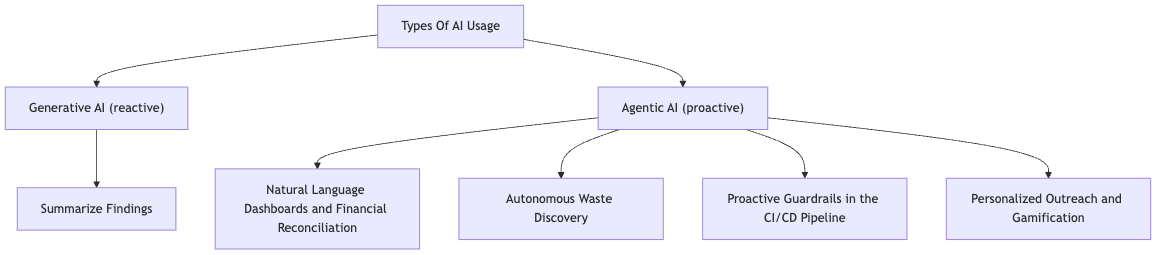
AI for FinOps examples
Generative:
- Summarize Findings: We query raw data from APIs or spreadsheets. This data is fed into an LLM, which then generates a summary or a report.
Agentic:
Natural Language Dashboards and Financial Reconciliation: Using agentic systems that automatically process financial data, compare actual expenditures against budgets, and generate reports.
Autonomous Waste Discovery: Agentic systems do not merely flag underutilized resources; they automatically investigate them, identify the responsible owner, and can even create a Jira ticket.
Proactive Guardrails in the CI/CD Pipeline: AI analysts are integrated directly into the pull request workflow to check configurations against FinOps policies before infrastructure deployment, making costs visible before resource provisioning.
Personalized Outreach and Gamification: Sending personalized Slack messages that identify the person who last interacted with a given service and reaching out to them directly within the chat interface.
In the remainder of this article, I will implement the most exciting examples from these use cases using OpenOps.
What is OpenOps?
OpenOps is a no-code automation platform. It provides customizable workflows to automate various FinOps processes, such as cost optimization, budgeting, forecasting, allocation, and tagging. A key feature is that it is open-source and can be deployed directly onto an EC2 instance. In terms of usability, it is simple and accessible even for non-technical staff.
It integrates seamlessly with cloud providers, third-party FinOps tools, and a wide range of other services, including ticketing platforms (such as Jira), monitoring systems, and databases.
Implementation
OpenOps can be run locally, or as mentioned above, on an AWS EC2 instance. However, the latter is a relatively costly solution, given that the Docker images require over 10 GB of storage, and the recommended EC2 instance type is at least a t3.medium, though preferably a t3.large. While I did test this approach, it proved to be peripheral to the core topic, so I ultimately opted for local execution to ensure convenience during testing.
A key objective of FinOps is to enable collaborators from different domains to view financial operations through a single, shared lens, thereby facilitating smoother communication and action. Consequently, it was crucial for me to select a tool for this article that requires no technical background. Had I disregarded this requirement, the combination of AWS Step Functions (State Machine) and Lambda would have been the winning choice, as it could have delivered the exact same functionality in a more cost-effective and professional manner.
To interact with other services, OpenOps requires the following: AWS access (via either an IAM user or a role), an API key for an AI provider of choice, and access to the relevant communication channels. For this demo, I utilized the Anthropic API alongside Jira and Slack integrations, with AWS serving as the cloud provider. Out of the use cases listed above, I implemented two: Personalized Outreach and Autonomous Waste Discovery. I specifically wanted to incorporate both a chat interface and a ticketing system, especially since CI/CD integration is already largely covered by other dedicated services, such as Infracost. Let’s look at the examples:
Personalized Outreach
In this use case, I will demonstrate one of the previously mentioned methods: personalized outreach. My goal here is to analyze virtual machine utilization, and if I find anything that requires modification, notify the responsible individual or team directly via chat. In this specific setup, I used Slack, though it can be adapted to Discord or other chat applications with minimal customization. According to the FinOps Foundation’s summary, this approach can increase response rates by up to 50%.
A recurring pattern can be observed throughout the implementation: we query raw data using either the CLI or an API, which is then fed into a model. Within the prompt, I instruct the model to provide a structured response, consisting of a brief summary and a decision on which predefined path the operation should follow.
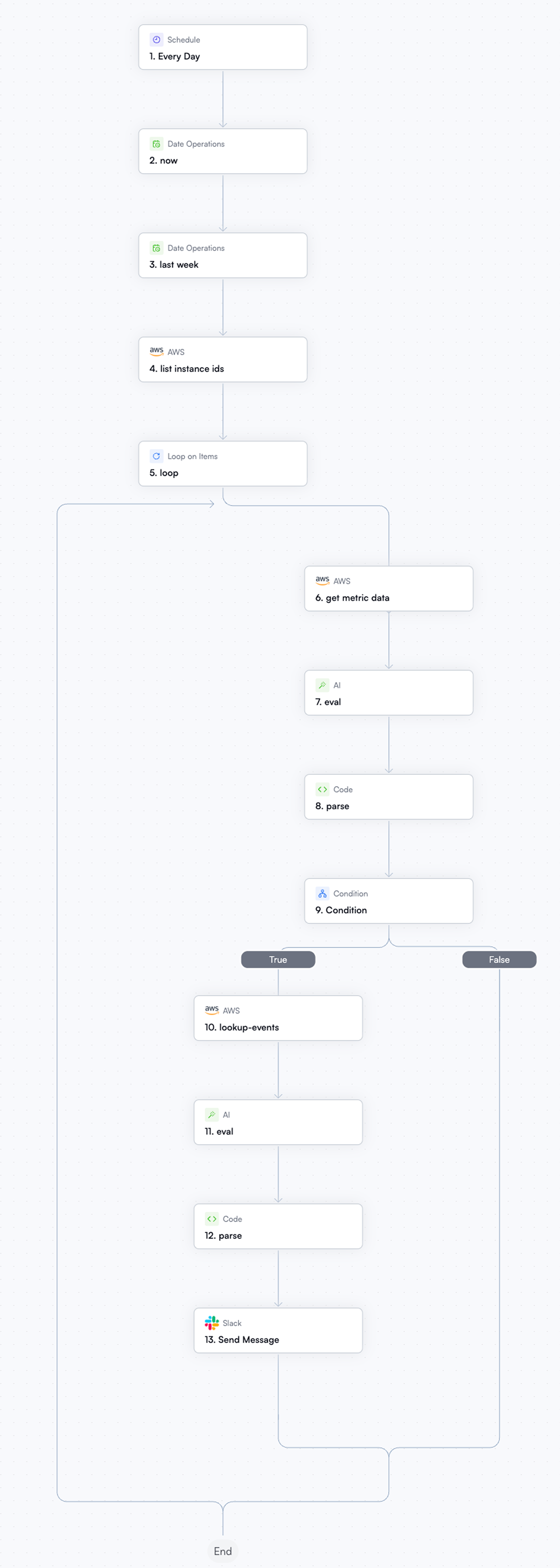
Broken down into steps, it works something like this:
I define two variables: the execution date and the date from one week prior. These are required for the CLI commands to specify the time interval.
I list the instances, then iterate through this list one by one.
During each iteration, I fetch the metrics for the given instance, then use an Anthropic API call to determine whether we actually need the machine or if a smaller instance type would suffice. I leverage structured outputs for this, instructing the model in the prompt to return its response in JSON format. This is beneficial because this type of response can easily be evaluated later using simple logic.
I present the model with a binary choice: if the condition evaluates to true, the workflow dives deeper into the logs to identify who last interacted with the instance.
Jira Ticket Workflow
- Once the logs reveal the nature and the author of the last interaction or change, the system sends a message to the appropriate Slack channel. If we want to be even more precise, it is also possible to tag and address a specific individual; in the next example, for instance, we will assign a Jira ticket to someone.

Claude Sonnet notification about an underutilized VM on Slack
Autonomous Waste Discovery
Similar to the previous use case, we query data here as well, but we process it in a more complex manner. We analyze our infrastructure across multiple services, and a model then generates summaries of these insights. These summaries are logged into an external spreadsheet, allowing us to compare past entries with the current state during each execution. With this approach, the model can detect trends, enabling it to automatically create a Jira ticket for the appropriate specialist if it senses anything unusual or anomalous.
Broken down into steps, it works as follows:
I retrieve the date for the current row of the spreadsheet.
I analyze the infrastructure using two services: Compute Optimizer and Cost Explorer. To make the process clearer and more manageable, I utilized a loop and a branch, since parallelization in OpenOps is not as seamless as it is in AWS Step Functions (State Machine). Compute Optimizer inherently leverages AI and specifically monitors compute-related services, while Cost Explorer provides raw data regarding your broader cloud usage.
For both services, I request a summary from the model, which I then write into the external spreadsheet. The row key is the current date, and the columns represent the two tools.
I fetch the external spreadsheet (either the entire sheet or looking back to a specific timestamp) and feed it to the model. At this point, the model must decide whether to request an intervention or a review.
If an intervention is required, the model generates a description and a title for the ticket. Using the Jira integration, I list potential assignees and create the ticket.
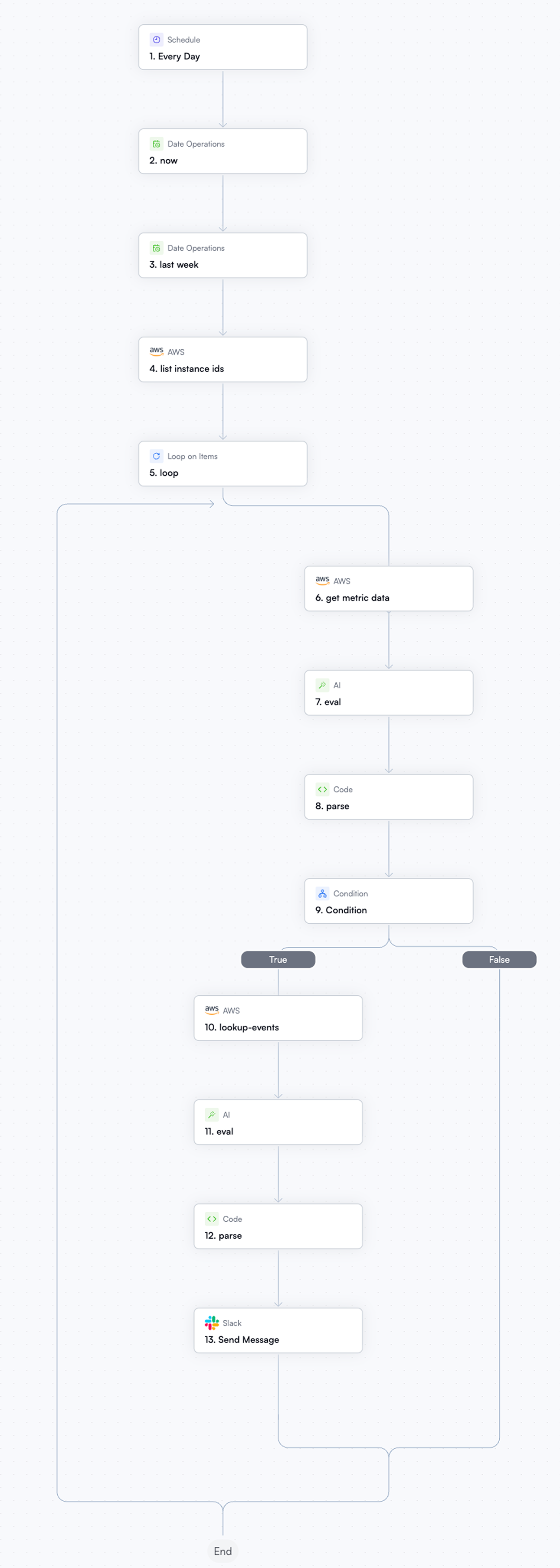
Jira Ticket Workflow
Jira Ticket:
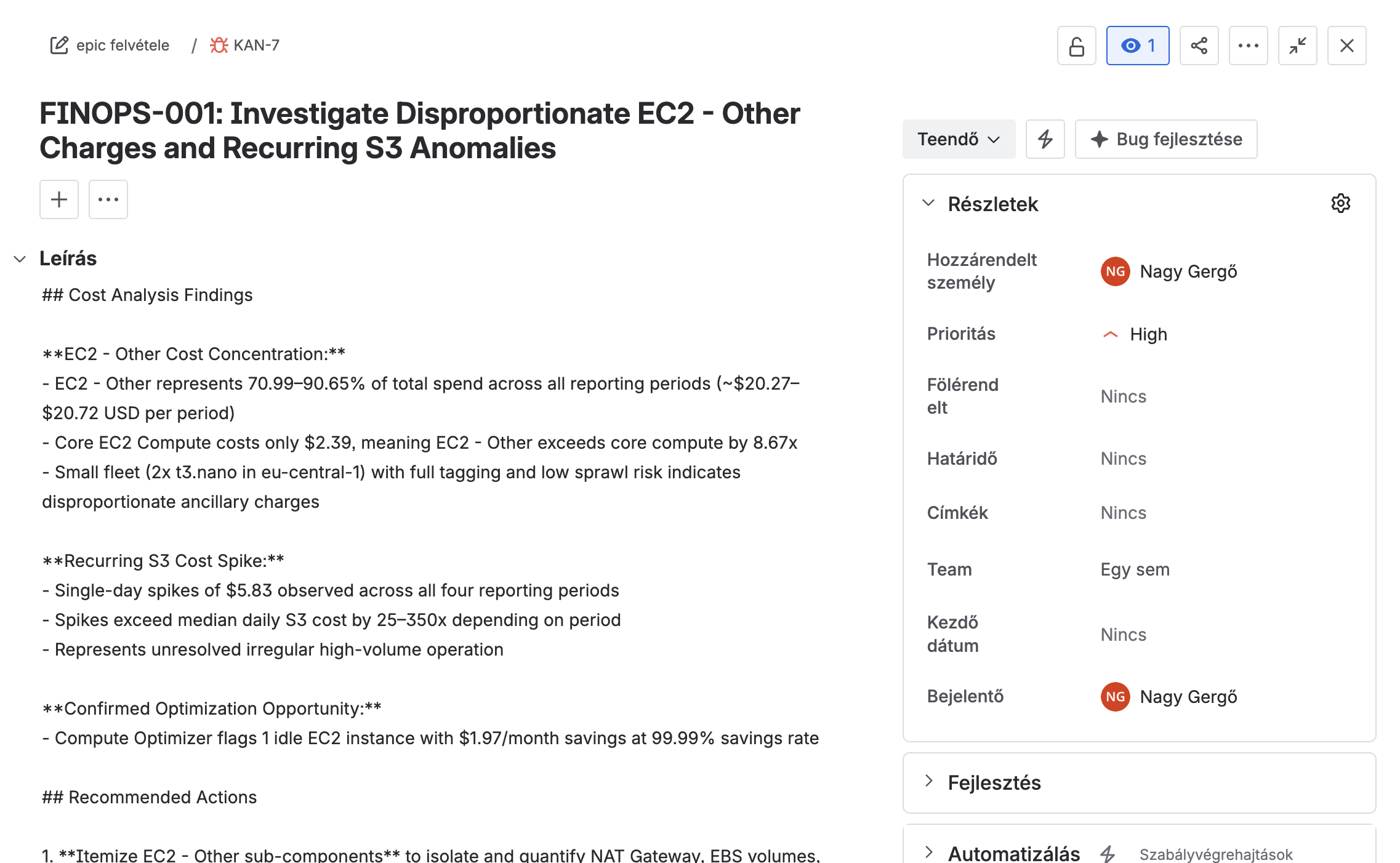
FinOps Jira Ticket
In these examples, the model only provides alerts; it does not independently destroy or downscale anything. While it is possible to include approve/disapprove links within the automations to confirm a destructive action with a single click, it might be a better approach to exit the automation and proceed manually. For this task, the AWS Cost Optimization extension for Kiro is a perfect solution.
Kiro Powers
Compared to the previous examples, Kiro for Cost Optimization is an outlier because it is not an automation, but rather a built-in extension for Kiro that allows you to query and analyze costs directly from your development environment. It is suitable for the following tasks:

AWS Cost Optimization
Cost Analysis: It shows you how much you are spending, on which services, and provides future spending forecasts.
Optimization Recommendations: It identifies underutilized or oversized resources.
Pricing Intelligence: It compares AWS service pricing across different regions and can analyze your IaC (Infrastructure as Code) projects prior to deployment.
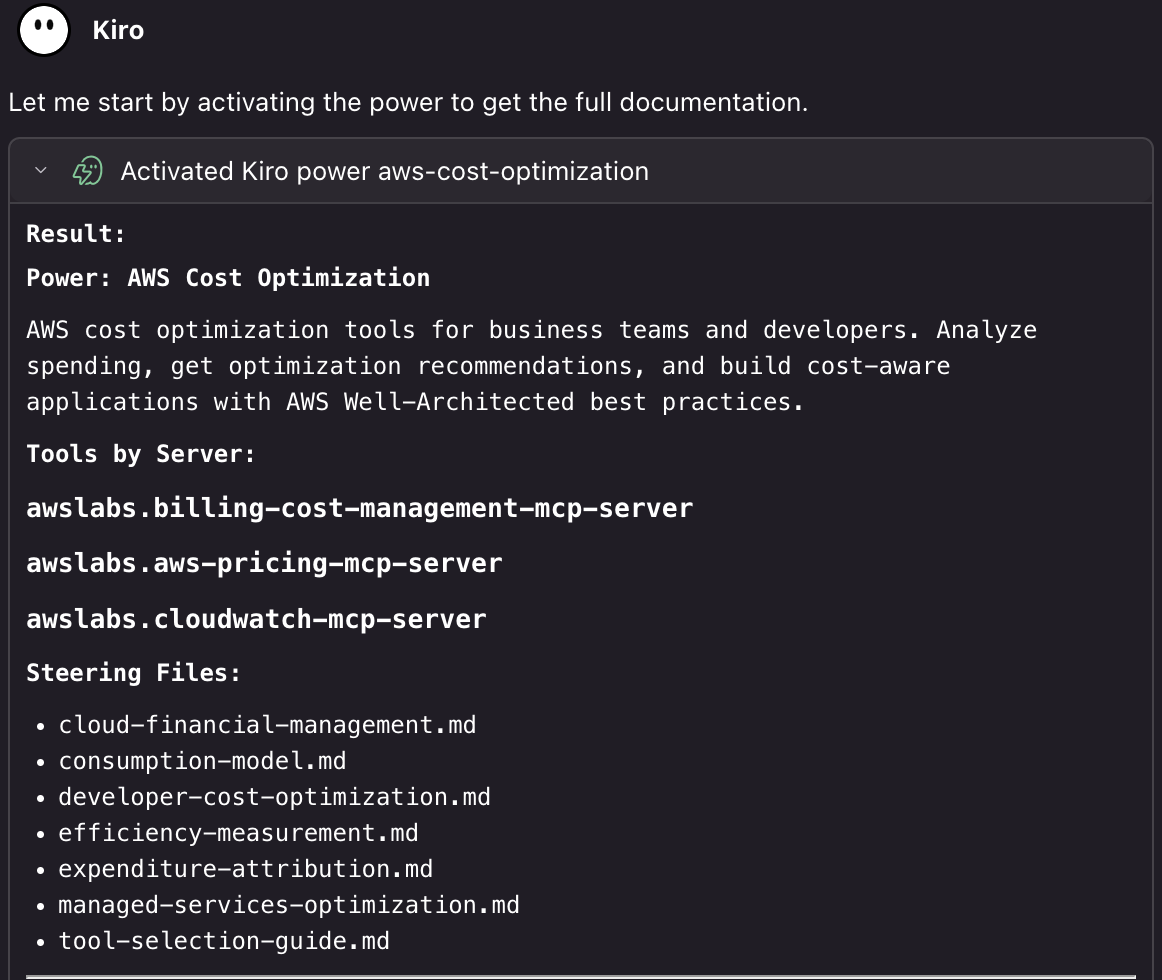
AWS Cost Optimization Documentation
The tool can be highly valuable in the initial phases, as it is capable of estimating costs based on your infrastructure code; furthermore, if the automated checks uncover any issues, it can also assist you with remediation and optimization.
Summary
According to the FinOps Foundation’s 2026 survey, more mature organizations monitor cloud costs in real time, flag unnecessary expenditures, and provide alerts during the development phase if a change would prove costly. Human oversight is not going away; rather, AI acts as an advisor instead of an autonomous decision-maker. If we decide to leverage FinOps methodologies within our organization, we will have a clear path ahead, as numerous checks can be automated similarly to the examples above. Furthermore, through the FOCUS project, the FinOps community provides a well-defined framework to guide us and help us learn about responsible, professional cloud cost management.
Sources:
Are you interested in this topic? Do you have any questions about the article? Book a free consultation and let’s see how the Code Factory team can help you, or take a look at our services!